Project overview
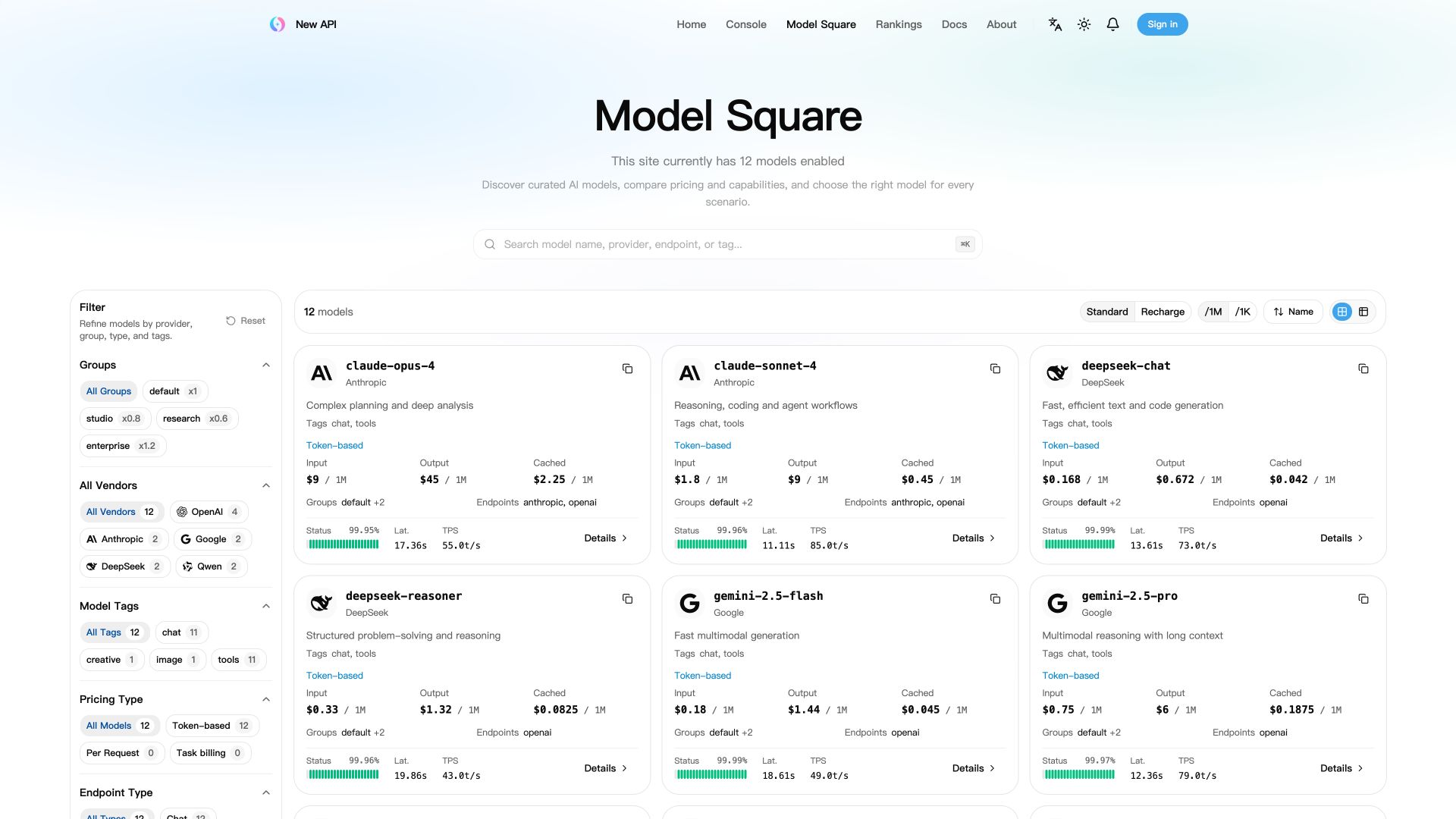
New API is a self-hosted AI gateway written in Go: an intermediary deployed in your own environment between applications and upstream model services. Its web console centralizes model connections, request routing, user permissions, usage records, and costs.
Supported upstream services include OpenAI, Anthropic, Google Gemini, Azure OpenAI, AWS Bedrock, Vertex AI, DeepSeek, and Qwen. Available features depend on the channel, upstream model, and protocol conversion path; some protocol-specific tools and fields may not map exactly.
The project uses the AGPL-3.0 license, and the README specifies additional requirements to retain attribution and a link to the original project. Review LICENSE and NOTICE in the original repository before using or modifying it. This page lists the repository link only; runnable packages and core workflows have not been verified.
Use cases
New API suits teams that need to distribute authorized model access, provide a consistent interface for applications or agents, or operate a private multi-model service through a web console. It may be useful when switching providers, allocating user quotas, reviewing requests, or accounting for model costs.
For financial or legal assistance applications, it can serve as the underlying model access and usage management component. The supplied material does not describe specialized financial analysis, legal advice, or validation of business accuracy.
What it does and problems it solves
It brings multiple upstream model services into one management interface, reducing the need to reconfigure individual clients when changing providers. Model mappings, channel priorities, weights, and retries control how requests reach upstream services.
Users, groups, fine-grained permissions, and API key restrictions control access. Quotas, subscriptions, usage logs, and pricing settings support usage tracking and cost accounting. The web console also provides channel configuration, audit log inspection, and a model playground.
Users must obtain valid, authorized upstream accounts, API keys, and interface permissions themselves and follow the relevant service terms. The gateway does not replace those authorizations.
How to use
1. After installing and starting the service, obtain the console address from the original repository's quick-start instructions. Open the setup wizard and create an administrator account. The page address in the supplied material is redacted.
2. Add a channel in the console, enter your upstream API key, configure available models and a group assignment, and run a channel test. A channel is the configuration that connects an upstream model service.
3. Configure model pricing and ensure the user has available quota or a valid subscription.
4. Create a New API-issued API key in the console with access to the same group and models.
5. Set your application or client's base address to the gateway and use the New API-issued key. Check the original repository for the exact address format for OpenAI-compatible clients; that address is malformed in the supplied material.
6. Send a request using an enabled model that supports the intended interface, then inspect usage and costs in the console. The supplied request examples contain redacted authentication content and should not be copied and run directly; consult the complete examples in the original repository first.
Installation
1. Prepare an environment that can run Docker Compose. The README provides container deployment instructions and lists Linux amd64 and arm64 as container platforms. It does not explain how to install Docker itself; consult the relevant tool's installation instructions first.
2. Obtain the clone address from the original repository shown below this page and clone the repository locally. Then enter the project directory in your terminal with `cd new-api`.
3. Open `docker-compose.yml`. Its default configuration starts New API, PostgreSQL, and Redis. Replace the example database and Redis passwords, including the corresponding passwords in connection strings.
4. Set a persistent random `SESSION_SECRET`, which is used for authentication. The README provides `openssl rand -hex 32` to generate it. Store the result securely and do not publish it.
5. For an HTTPS console, set `SESSION_COOKIE_SECURE=true` and configure `SESSION_COOKIE_TRUSTED_URL` according to the original repository. Pass container variables through Compose's `environment` or `env_file`; copying `.env.example` alone does not inject them into the container.
6. Run `docker compose up -d` from the project directory to start the services, then run `docker compose logs -f new-api` to inspect logs. Complete initialization using the steps in the usage section.
7. Before production use, persist and back up the database and mounted data. Follow the README to configure HTTPS and a reverse proxy for streaming responses and WebSocket connections. Select a fixed image version from Releases in the original repository and review its upgrade notes; `latest` changes with published builds. Installation results have not been verified for this page.
Source and usage notes
- Original repository: https://github.com/QuantumNous/new-api
- Source revision: a2defd2a8256abe039e5295bd583aeb2d02f111f
This listing links to the upstream repository. It does not provide a verified download package, and the complete workflow has not been independently validated.
This description was organized and translated with AI from public upstream material. Refer to the original repository for capabilities, setup requirements, costs, and license terms.